Wednesday, October 18, 2006
Friday, October 06, 2006
test from PFF
This is a test of Performancing for Firefox 1.3dev20061006, a test build with Blogger Beta integration.
Says Jed:
* This build works for both Beta and normal blogger account. Finally pff should not care which one you are talking to and set them up the same.
it does
* The PFF theme should now look more like what your os theme looks like. (i.e. the background color).
it does
* If you use Master Passwords in Firefox, it should now only ask you once, (not 10 times)
yes
* For blogger BETA accounts, you can now add Labels to your post!! You can do this under the 'Category' tab (Categs.)
yes
* You can also edit older posts and change their categories by unchecking them and adding more.
yes
* Drafts work, but only for NON beta accounts. This is an issue on beta.blogger.com that they are looking into, so it might start working whenever they fix it.
duly noted
All signs point to yes!
Says Jed:
* This build works for both Beta and normal blogger account. Finally pff should not care which one you are talking to and set them up the same.
it does
* The PFF theme should now look more like what your os theme looks like. (i.e. the background color).
it does
* If you use Master Passwords in Firefox, it should now only ask you once, (not 10 times)
yes
* For blogger BETA accounts, you can now add Labels to your post!! You can do this under the 'Category' tab (Categs.)
yes
* You can also edit older posts and change their categories by unchecking them and adding more.
yes
* Drafts work, but only for NON beta accounts. This is an issue on beta.blogger.com that they are looking into, so it might start working whenever they fix it.
duly noted
All signs point to yes!
Labels: blogger beta, extensions, performancing
Tuesday, September 26, 2006
blogger beta and feeds and your readers and blah blah blah
the power of trillwing compels me.
if you are using blogger beta and you also burn your feed with feedburner, go into your feedburner settings and change your source feed URL from http://[whatever].blogspot.com/atom.xml or http://[whatever].blogspot.com/rss.xml to http://[whatever].blogspot.com/feeds/posts/full
if you are using blogger beta and you are not burning your feed with feedburner, tell all your users to switch to this URL for the feed: http://[whatever].blogspot.com/feeds/posts/full by writing a post about it or something
if you are a proactive blog reader and you know the feeds for your favorite blogs aren't updating in your reader [note: any feed reader] AND you know these blogs to be of the blogger beta type, just change the subscription in your reader from http://[whatever].blogspot.com/atom.xml or http://[whatever].blogspot.com/rss.xml to http://[whatever].blogspot.com/feeds/posts/full
that should take care of most blogger beta feedy things. oh also if you're a feedburner, don't forget to manually ping after publishing.
the power of trillwing compels me.
if you are using blogger beta and you also burn your feed with feedburner, go into your feedburner settings and change your source feed URL from http://[whatever].blogspot.com/atom.xml or http://[whatever].blogspot.com/rss.xml to http://[whatever].blogspot.com/feeds/posts/full
if you are using blogger beta and you are not burning your feed with feedburner, tell all your users to switch to this URL for the feed: http://[whatever].blogspot.com/feeds/posts/full by writing a post about it or something
if you are a proactive blog reader and you know the feeds for your favorite blogs aren't updating in your reader [note: any feed reader] AND you know these blogs to be of the blogger beta type, just change the subscription in your reader from http://[whatever].blogspot.com/atom.xml or http://[whatever].blogspot.com/rss.xml to http://[whatever].blogspot.com/feeds/posts/full
that should take care of most blogger beta feedy things. oh also if you're a feedburner, don't forget to manually ping after publishing.
Labels: blogger, blogger beta, feedburner
Monday, September 11, 2006
flickr support for blogger beta
Flickr is one of the first (if not the first) to upgrade their service to include an authentication/posting method for Blogger Beta.
Read the Blogger Buzz announcement.
I hope this signals a wave of upgrades for other third-party services, although the majority of the ones I use fall into that "not owned by Yahoo! or Google" category and therefore resources are scarce. I would be super pleased if Performancing for Firefox were next on the list. Fingers crossed.
Flickr is one of the first (if not the first) to upgrade their service to include an authentication/posting method for Blogger Beta.

Read the Blogger Buzz announcement.
I hope this signals a wave of upgrades for other third-party services, although the majority of the ones I use fall into that "not owned by Yahoo! or Google" category and therefore resources are scarce. I would be super pleased if Performancing for Firefox were next on the list. Fingers crossed.
Labels: blogger, blogger beta
Thursday, August 31, 2006
blogger beta: template editing now available
Just a quick post to say that template editing is now available for Blogger Beta templates.
In this post, I said:
* If you switch your blog to the Layout system, you can edit the raw template but be aware it's an entirely new template language.
Blogger starter documentation is available, and I'll write something substantial (finally) over the weekend.
Just a quick post to say that template editing is now available for Blogger Beta templates.
In this post, I said:
* If you switch your blog to the Layout system, you cannot edit the raw template (yet).It should now read:
* If you switch your blog to the Layout system, you can edit the raw template but be aware it's an entirely new template language.
Blogger starter documentation is available, and I'll write something substantial (finally) over the weekend.
Labels: blogger, blogger beta
Thursday, August 24, 2006
more clarification on migrating to Blogger Beta
Pete Hopkins, esteemed member of the Blogger development team, stopped by to comment on my post about the path of migration with regards to accounts and what not. I'm pulling his comment up to this post so more people will read it.
After he verified that my info was correct (yay!), when talking about how accounts are linked to email address (or not), for those concerned with anonymity/pseudonymity:
Pete Hopkins, esteemed member of the Blogger development team, stopped by to comment on my post about the path of migration with regards to accounts and what not. I'm pulling his comment up to this post so more people will read it.
After he verified that my info was correct (yay!), when talking about how accounts are linked to email address (or not), for those concerned with anonymity/pseudonymity:
Actually, your blog is never publicly linked with your Google Account login or Gmail address unless you choose.Thanks, Pete!
So you can use the Google Account that's most convenient for you.
Just check over your Blogger profile to make sure you're not exposing anything publicly that you don't want.
But of course using separate accounts works, too, and may give you more peace of mind if you don't mind logging in and out of Google Accounts.
Labels: blogger, blogger beta
Saturday, August 19, 2006
on migrating or not to Blogger Beta
This is just a brief post to answer a few questions and clear up some things. It's not an in-depth technical post or anything, just a "this is the path of migration" sort of post. It goes with the comments attached to this post.
* When you migrate from Blogger to Blogger Beta, it is based on your account and any blog attached to your account. Thus, if you have three blogs attached to your account (as I do), they all get shipped over AS-IS to Blogger Beta and the only thing that changes is your login and the server to which you login (beta.blogger.com instead of www.blogger.com). Thus, you cannot migrate selected blogs under your account—they all come along for the ride.
* Migrating your blog does not screw up any of your template customizations or settings. The act of migrating simply gets your account info squared away and your stuff within the new architecture.
* To reiterate, your custom template remains intact until you specifically change it to the Layout system.
* You can manually change one blog to the Layout system and keep your other blog(s) in the classic system, because as with any of your blogs-in-Blogger (beta or otherwise) the blog-specific settings are just that—blog-specific.
* If you keep your blog in classic mode, you can edit your template just as you always could. What you cannot do is use the Layout system and therefore the native Blogger categories (labels) system.
* If you switch your blog to the Layout system, you cannot edit the raw template (yet).
* If you switch your blog to the Layout system, you can edit the raw template but be aware it's an entirely new template language
* If you switch your blog to the Layout system, you will be starting from scratch. You can make customizations through the Layout system by adding "page elements" using the Layout system editor. The customizations may require massaging, especially when it comes to things that require additions to stylesheets or the placement of items in the HEAD element of your blog.Since you cannot yet edit the raw template, you cannot create the sort of combo Layouts/custom template that would be necessary to complete the integration of your stuff.
* If you migrate your account to Blogger Beta and use any third-party publishing tools (e.g. Performancing for Firefox), you'll be out of luck until a new build of the tool becomes available—developers need to add in new hooks to the system.
I think that clarifies a few things. If not, leave a comment and I'll try again.
This is just a brief post to answer a few questions and clear up some things. It's not an in-depth technical post or anything, just a "this is the path of migration" sort of post. It goes with the comments attached to this post.
* When you migrate from Blogger to Blogger Beta, it is based on your account and any blog attached to your account. Thus, if you have three blogs attached to your account (as I do), they all get shipped over AS-IS to Blogger Beta and the only thing that changes is your login and the server to which you login (beta.blogger.com instead of www.blogger.com). Thus, you cannot migrate selected blogs under your account—they all come along for the ride.
* Migrating your blog does not screw up any of your template customizations or settings. The act of migrating simply gets your account info squared away and your stuff within the new architecture.
* To reiterate, your custom template remains intact until you specifically change it to the Layout system.
* You can manually change one blog to the Layout system and keep your other blog(s) in the classic system, because as with any of your blogs-in-Blogger (beta or otherwise) the blog-specific settings are just that—blog-specific.
* If you keep your blog in classic mode, you can edit your template just as you always could. What you cannot do is use the Layout system and therefore the native Blogger categories (labels) system.
* If you switch your blog to the Layout system, you can edit the raw template but be aware it's an entirely new template language
* If you switch your blog to the Layout system, you will be starting from scratch. You can make customizations through the Layout system by adding "page elements" using the Layout system editor. The customizations may require massaging, especially when it comes to things that require additions to stylesheets or the placement of items in the HEAD element of your blog.
* If you migrate your account to Blogger Beta and use any third-party publishing tools (e.g. Performancing for Firefox), you'll be out of luck until a new build of the tool becomes available—developers need to add in new hooks to the system.
I think that clarifies a few things. If not, leave a comment and I'll try again.
Labels: blogger, blogger beta
I switched my blogs to Blogger Beta
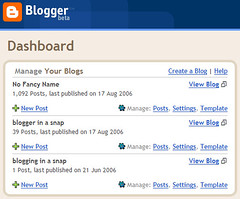
I have switched my blogs over to Blogger Beta, which is the first step in trying to provide to you, dear readers, information about the process, the features, etc.
The dashboard is so lovely now, no? Also, the new NavBar—both contain far more useful elements than before. Thank you, Blogger Team, for listening to your users.
Actually, I believe that "thank you" is applicable to all the changes they've made, but I reserve judgement on that until I see with my own two eyes just how much we can tweak our templates and still use the new layout system.
However, I am very confident in the Blogger Team's ability to deliver on this, as Jason has stated:
My plan is to go total Layouts system for the blog for my book, and Layouts/Custom combo for this blog, when the combo is available.
The only downside to using Blogger Beta right now is not a Blogger issue per se, and even it's being worked on as we speak. That is, I can't use Performancing for Firefox because the hooks aren't in for the new API. I'm confident a new build will be available soon, though.
technorati tag: blogger, blogger beta, performancing for firefox
I have switched my blogs over to Blogger Beta, which is the first step in trying to provide to you, dear readers, information about the process, the features, etc.
The dashboard is so lovely now, no? Also, the new NavBar—both contain far more useful elements than before. Thank you, Blogger Team, for listening to your users.
Actually, I believe that "thank you" is applicable to all the changes they've made, but I reserve judgement on that until I see with my own two eyes just how much we can tweak our templates and still use the new layout system.
However, I am very confident in the Blogger Team's ability to deliver on this, as Jason has stated:
Fortunately, it's always been part of our plan to introduce a new Edit HTML system for Blogger in beta. This system will not only let folks have the degree of customizability they desire, but it will let you create templates that are customizable with the Layouts system. Right now we are finishing the first version of this system and will be introducing in the "days not weeks" timeframe.Plus, Pete has been answering questions at Freshblog, and I'm sure neither of these guys would bounce around the internet talking about their baby unless they really meant what they said.
My plan is to go total Layouts system for the blog for my book, and Layouts/Custom combo for this blog, when the combo is available.
The only downside to using Blogger Beta right now is not a Blogger issue per se, and even it's being worked on as we speak. That is, I can't use Performancing for Firefox because the hooks aren't in for the new API. I'm confident a new build will be available soon, though.
technorati tag: blogger, blogger beta, performancing for firefox
Labels: blogger, blogger beta
Monday, August 14, 2006
Amazing New Blogger Things!
More on this later, but via Blogger Buzz comes the Blogger in beta announcement.
There are SO MANY lovely things being added to Blogger, which dovetails nicely with discussions about refreshing my Blogger book.
I am not one of the lucky few who could migrate their existing account with the new and improved Google accounts login (hey guys, pretty please could you sneak me in there?) but I created an account on the beta site and can test that way. I'm stoked!
Note: Any snarky comments about "well, my blog platform already offers x,y,z" will be met with silence. I don't care. If I wanted to switch platforms, I would have. I didn't, because I like Blogger. So, whatever.
[cross-posted at Blogger in a Snap]
technorati tags: blogger
More on this later, but via Blogger Buzz comes the Blogger in beta announcement.
There are SO MANY lovely things being added to Blogger, which dovetails nicely with discussions about refreshing my Blogger book.
I am not one of the lucky few who could migrate their existing account with the new and improved Google accounts login (hey guys, pretty please could you sneak me in there?) but I created an account on the beta site and can test that way. I'm stoked!
Note: Any snarky comments about "well, my blog platform already offers x,y,z" will be met with silence. I don't care. If I wanted to switch platforms, I would have. I didn't, because I like Blogger. So, whatever.
[cross-posted at Blogger in a Snap]
technorati tags: blogger
Labels: blogger, blogger beta
04/04 · 05/04 · 06/04 · 07/04 · 08/04 · 09/04 · 10/04 · 11/04 · 12/04 · 01/05 · 02/05 · 03/05 · 04/05 · 05/05 · 06/05 · 07/05 · 08/05 · 09/05 · 10/05 · 11/05 · 12/05 · 01/06 · 02/06 · 03/06 · 04/06 · 05/06 · 06/06 · 07/06 · 08/06 · 09/06 · 10/06 · 11/06 · 12/06 · ???
